 Salomon Web Services
The Americans with Disabilities Act (ADA) was signed in 1990, before the modern web existed. Federal courts have spent the last decade establishing that ADA applies to commercial websites, not just physical premises. In 2025, the legal landscape settled to a clear position: US commercial websites must be accessible to users with disabilities, and businesses that aren’t are exposed to lawsuits.
The volume of these lawsuits has grown dramatically. Around 800 federal ADA website lawsuits were filed in 2018. By 2025, that number was over 4,000 federal cases, with thousands more demand letters that never made it to court because businesses settled quickly. The targets have shifted from large enterprises (which mostly fixed their sites in 2019-2020) to small and mid-size businesses (which mostly haven’t).
The good news is that compliance is achievable and bounded. The bad news is that the cost of getting caught non-compliant is higher than the cost of getting compliant. Most small business owners learn this when they receive the demand letter.
What ADA compliance actually means for websites
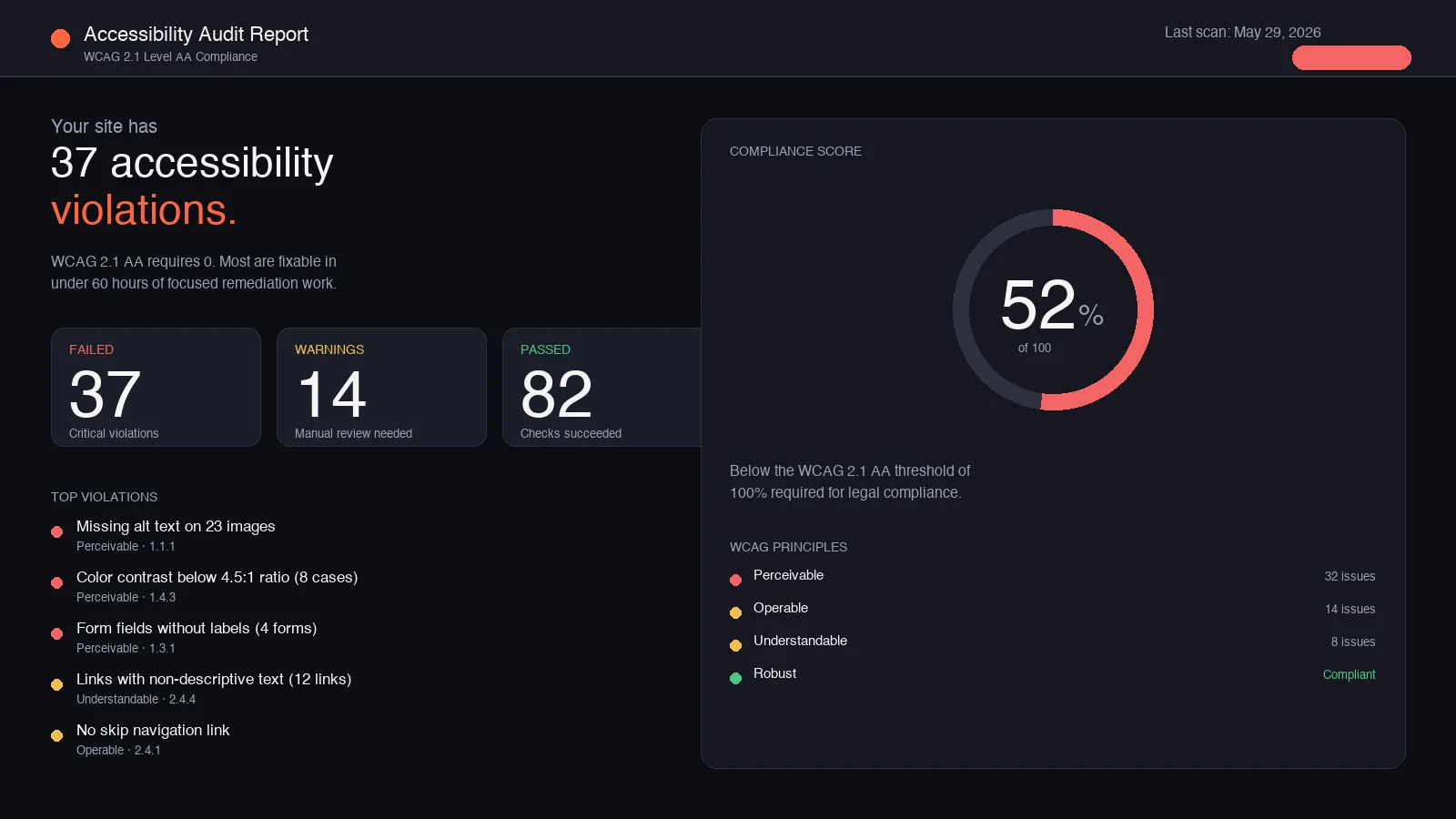
The legal standard most courts apply is WCAG 2.1 Level AA, published by the W3C. This is a set of 50 specific success criteria covering four principles:
Perceivable. Information must be presentable to users in ways they can perceive. Includes alt text on images, captions on videos, sufficient color contrast, text that can be resized.
Operable. Interface components must be operable by all users. Includes keyboard navigation for everything (no mouse-only interactions), enough time to read content, no content that triggers seizures.
Understandable. Information and operation must be understandable. Includes readable text, predictable behavior, input assistance for forms.
Robust. Content must be robust enough to work with current and future assistive technologies. Includes proper HTML semantics, ARIA labels where needed, compatibility with screen readers.
For a typical US small business website, full WCAG 2.1 AA compliance requires addressing 30-50 specific issues that almost every site has. Most are fixable in hours, not days.
The most common violations we find
After auditing hundreds of US small business websites for accessibility, the patterns are consistent. The 10 violations that show up on almost every non-compliant site:
1. Missing alt text on images. Every meaningful image needs descriptive alt text. Decorative images need empty alt attributes. Most small business sites have images with no alt text at all, which makes the page unreadable for screen reader users.
2. Insufficient color contrast. Text needs to have at least 4.5:1 contrast ratio against its background (3:1 for large text). Light gray text on white backgrounds is the most common violation. So is white text on light-colored hero images.
3. Form fields without labels. Every form field needs a programmatically associated label that screen readers can announce. Placeholders alone don’t count. Most contact forms on small business sites fail this.
4. Links without descriptive text. “Click here” and “Read more” tell screen reader users nothing about where the link goes. Every link needs descriptive text that makes sense out of context.
5. Non-keyboard-navigable interactive elements. Custom buttons, dropdowns, modals, and carousels often work only with a mouse. Keyboard users can’t operate them. WCAG requires everything to be reachable and operable via keyboard alone.
6. Missing or incorrect heading hierarchy. Pages need a logical heading structure: one H1 per page, H2s for major sections, H3s for subsections. Many sites use heading tags for visual styling rather than structure, breaking screen reader navigation.
7. Auto-playing video or audio. Anything that plays automatically without user control violates WCAG. Hero videos that auto-play with sound are a common issue.
8. Missing language declaration. The <html> tag needs lang="en" (or appropriate language code) so screen readers use the correct voice and pronunciation.
9. Images of text instead of actual text. Text rendered as part of an image isn’t readable by screen readers. Logos are acceptable. Body content rendered as images is not.
10. No skip navigation link. Keyboard users need a way to skip past the navigation menu to get to the main content. Most sites don’t have this.
If your site has 5+ of these (most non-audited small business sites have 7+), it’s not WCAG 2.1 AA compliant.
The lawsuit landscape
The reason ADA website compliance has become urgent is the lawsuit volume. The pattern is consistent:
- A plaintiff (often the same handful of repeat plaintiffs in each state) uses a screen reader to visit your website
- Their attorney sends a demand letter citing specific WCAG violations
- The demand letter offers to settle for a defined amount (typically $5,000-$25,000 plus a commitment to remediate the site)
- Most businesses settle because litigating costs more than the settlement
- Some businesses receive multiple letters from different plaintiffs over the years if the site stays non-compliant
The targets are specifically small businesses because:
- They’re less likely to have a legal team that can respond effectively
- They’re more likely to settle quickly to avoid litigation costs
- They often have no documentation of compliance efforts (which would be a defense)
- Their websites have more violations than enterprise sites (because no one ever audited them)
In some states (California, New York, Florida especially), specialized law firms have built ADA website lawsuits into a high-volume practice. They use automated tools to scan websites for violations and file lawsuits in batches.
What compliance actually requires
For a typical US small business website, the path to WCAG 2.1 AA compliance involves:
Phase 1: Audit (1-2 weeks)
- Run automated accessibility scanning (axe DevTools, WAVE, Lighthouse) on every page
- Manual testing with screen reader (NVDA on Windows, VoiceOver on Mac)
- Manual keyboard navigation testing
- Color contrast verification with tools like WebAIM Contrast Checker
- Compile a remediation list with severity ratings
The audit produces a specific list of what needs to be fixed.
Phase 2: Remediation (4-8 weeks for most sites)
- Add alt text to all images
- Fix color contrast issues in design system
- Add proper labels to all forms
- Rewrite vague link text
- Fix keyboard navigation for all interactive elements
- Correct heading hierarchy on all pages
- Add skip navigation link
- Add language declaration
- Replace image-based text with actual text
- Address any auto-playing media
For most small business sites, the remediation is 40-80 hours of focused work. WordPress sites often take longer because page builders inject inaccessible markup that’s harder to fix without rebuilding sections.
Phase 3: Documentation (1 week)
- Create an accessibility statement on the website (typically at /accessibility/)
- Document the audit findings and remediation work
- Set up ongoing monitoring (typically annual re-audits)
- Add accessibility feedback mechanism (way for users to report issues)
The accessibility statement plus documentation of good-faith compliance efforts is a meaningful legal defense if a lawsuit does come.
What compliance does not require
The accessibility space has its share of misinformation and overlay tools that promise “instant compliance”. Two clarifications:
Overlay widgets (accessiBe, UserWay, AudioEye) don’t make you compliant. These tools add a floating accessibility menu to your site. They do not actually fix the underlying violations. They’ve been the subject of multiple lawsuits themselves, and many courts have rejected them as a defense. Some accessibility advocates consider them actively harmful. Real compliance requires fixing the actual code, not adding a widget.
You don’t need to make your site usable for every possible disability. WCAG 2.1 AA is the legal standard. AAA-level compliance is aspirational but not required. Some specific accessibility considerations (like sign language interpretation for videos) are AAA-level and not required for AA compliance.
You don’t need a complete rebuild. Most small business sites can be remediated within their existing structure. Rebuilding is sometimes necessary for sites with severe structural accessibility issues, but it’s not the default path.
The cost reality
The cost of compliance vs the cost of non-compliance:
Compliance:
- Initial audit: 10-20 hours of professional time
- Remediation: 40-80 hours of professional time
- Ongoing maintenance: a few hours per quarter to address new content
- Annual re-audit: 5-10 hours
Non-compliance (if a lawsuit comes):
- Settlement amount: typically $5,000-$25,000
- Legal fees: often equal to or greater than settlement
- Forced remediation: same work as proactive compliance, but on the plaintiff’s timeline
- Reputation cost: settlements are often public
- Repeat lawsuit risk: if you settle one and don’t remediate, you may receive another
The math heavily favors proactive compliance. The work is the same. The difference is timeline pressure and legal cost.
Industries with elevated risk
Some US small business industries face disproportionate ADA website lawsuit risk:
- Healthcare (medical, dental, optometry, physical therapy)
- Hospitality (hotels, restaurants, event venues)
- Retail with e-commerce (any online shopping)
- Educational services
- Financial services
- Legal services
- Real estate
If your business is in any of these categories and your website hasn’t been audited for accessibility in the last 2 years, the risk is meaningfully higher than average.
The strategic case beyond legal compliance
Even setting aside legal risk, web accessibility delivers tangible business value:
- Approximately 15-20% of US adults have some form of disability. Inaccessible sites exclude them as customers.
- Accessibility improvements often improve SEO (proper heading structure, alt text, semantic markup)
- Accessibility improvements often improve performance (cleaner code, less complexity)
- Accessibility improvements often improve usability for all users (clearer labels, better contrast, keyboard support)
- Government contracts and large enterprise B2B sales often require accessibility compliance
Treating accessibility as purely a legal compliance burden misses the customer-side value.
Where to start this quarter
If you’ve never had your site audited for accessibility, the order of operations:
- Run WAVE on your homepage to get an initial sense of violation volume
- Run Lighthouse accessibility audit in Chrome DevTools on 5 key pages
- Test keyboard-only navigation on your contact form
- Check color contrast on your primary text against backgrounds using WebAIM Contrast Checker
- Based on what you find, decide whether to fix in-house or engage an accessibility-focused agency
For most US small businesses, a focused 90-day compliance project closes the gap from “exposed” to “compliant with documentation”. The work is bounded. The legal protection is real. The customer-side benefits are durable.
The cost of waiting is asymmetric. Compliance work costs the same whether you do it on your timeline or under lawsuit pressure. Choosing your own timeline is meaningfully cheaper than choosing a plaintiff’s.
Frequently asked questions
What standard does a website need to meet for ADA compliance?
The legal standard most courts apply is WCAG 2.1 Level AA, a set of 50 specific success criteria covering perceivable, operable, understandable, and robust content. For a typical small business site, full compliance means addressing 30 to 50 specific issues, most of which are fixable in hours rather than days.
Do accessibility overlay widgets make a website ADA compliant?
No. Overlay tools like accessiBe and UserWay add a floating menu but do not fix the underlying violations, they have been the subject of lawsuits themselves, and many courts have rejected them as a defense. Real compliance requires fixing the actual code.
Why are small businesses being targeted with ADA website lawsuits?
Because they are less likely to have a legal team, more likely to settle quickly, usually have no documentation of compliance efforts, and their sites carry more violations than enterprise sites that were fixed years ago. Federal filings grew from a rare occurrence in 2018 to over 4,000 per year by 2025.